
Order Management System
Order Management System (OMS) is a complete business solution with Flutter Mobile App and Laravel Admin Panel that helps businesses to manage their orders, customers, inventory and reports efficiently. Easy to work with live order tracking and automated workflows.
Contact Us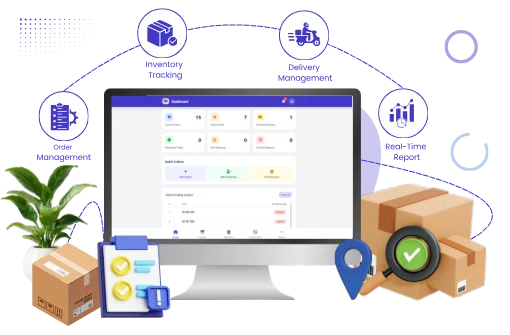
About Project
Location
India
Industry
E-commerce
Project Duration
1 Months
Team Members
2 People
The Challenges & Their Solutions
1. Manual Order Processing
Managing customer orders through spreadsheets and paperwork often resulted in delayed processing, duplicate entries, and operational inefficiencies.
1. Digital Order Management
The platform digitizes the complete order lifecycle, enabling users to create, manage, and monitor orders in real time from both mobile and web applications.
2. No Real-Time Order Visibility
Customers and staff had limited visibility into order progress, making communication difficult.
2. Live Order Tracking
Real-time order status updates allow customers and administrators to monitor every stage from order creation to delivery.
3. Complex Order Modification Process
Updating existing orders required manual communication, increasing errors and processing time.
3. Edit Request Workflow
Customers can submit edit requests directly through the application, while administrators can review, approve, or reject changes with complete transparency.
4. Difficult Cancellation Management
Handling order cancellations manually caused inventory mismatches and confusion.
4. Cancellation Request System
The system streamlines cancellation requests through an approval workflow that automatically updates order quantities and maintains complete records.
5. Poor Inventory Planning
Businesses struggled to identify pending quantities required for production and dispatch.
5. Pending Item Reports
Item-wise pending order reports provide real-time visibility into pending quantities, enabling better production planning and inventory management.
6. Limited Business Reporting
Business owners lacked accurate insights into order performance and operational efficiency.
6. Advanced Reports & Analytics
Comprehensive dashboards and reports provide detailed insights into orders, deliveries, cancellations, pending quantities, and customer activities for informed decision-making.
Key Features
Smart Dashboard
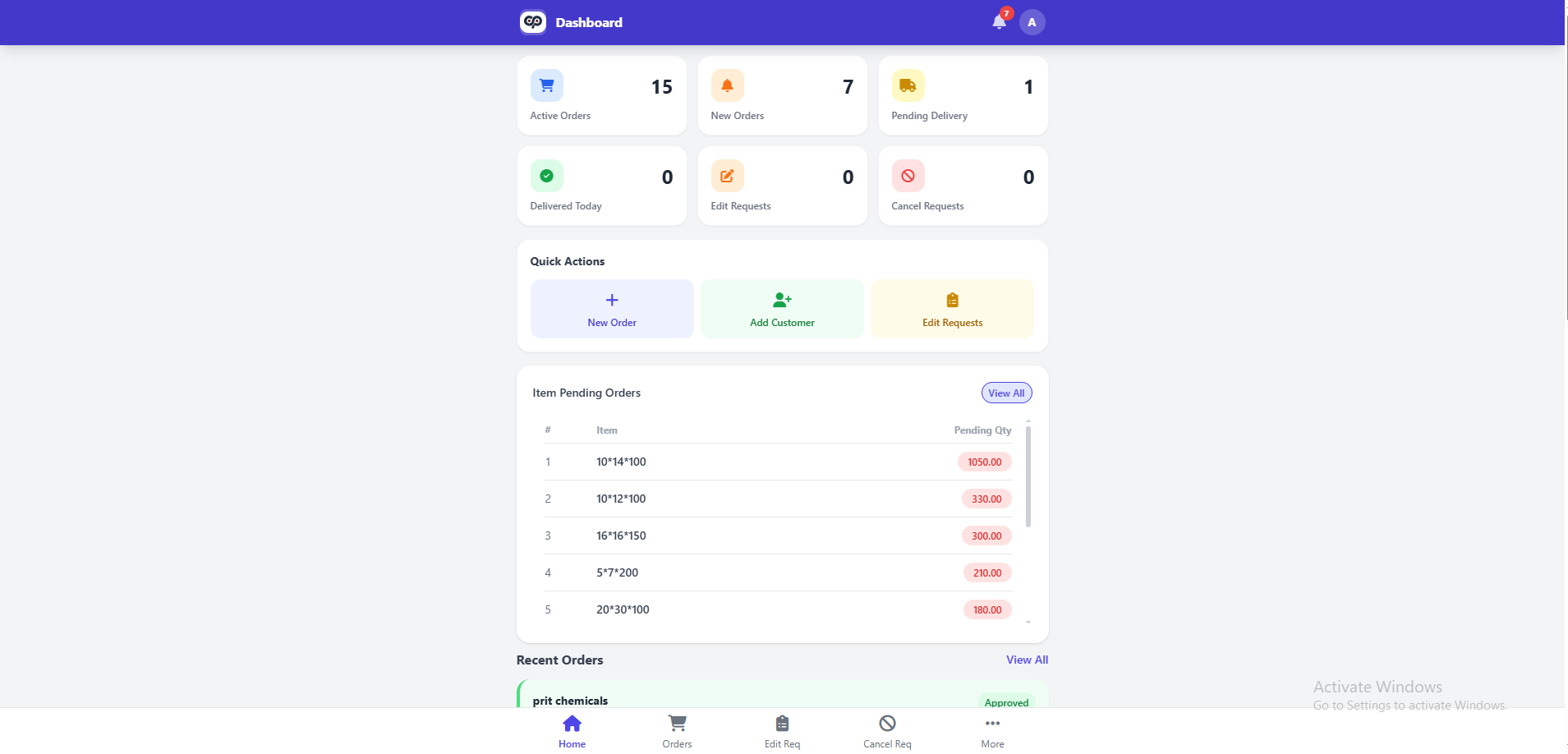
The app offers a potent dashboard to give you a complete picture of your daily business operations in real-time. The users can instantly monitor active orders, new orders, pending deliveries, completed deliveries, edit requests and cancelation requests from one screen. Quick Action Shortcuts Easier access to the most used modules such as order creation, customer addition, request handling. A centralized dashboard allows users to make decisions faster and improves operational efficiency.
Order Management
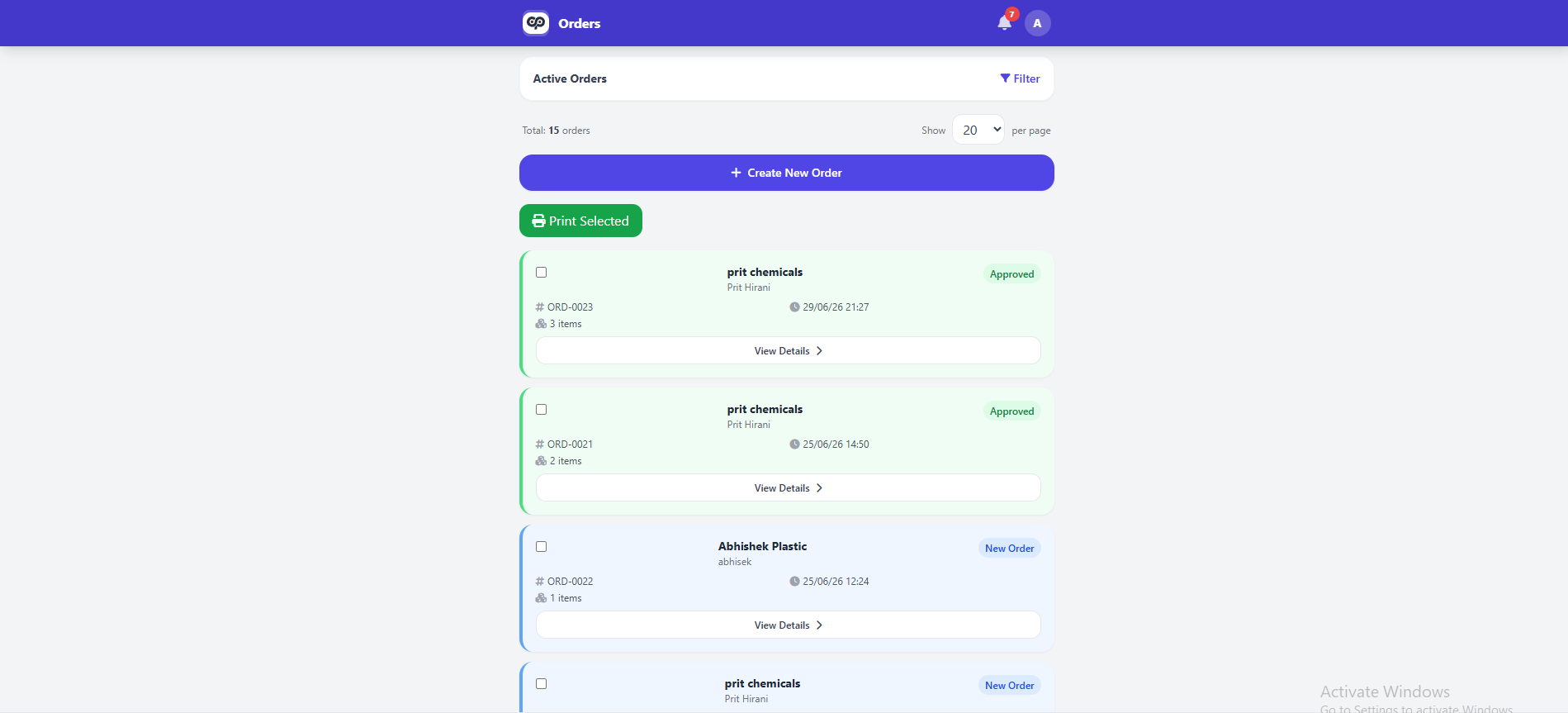
The platform simplifies the whole order management process from creation to the final delivery. Users can create new orders easily, track order status, search and filter records, print order details and track each transaction. The full customer details, product details, quantity and delivery status are included in every order. This systematic approach eliminates human error and allows the orders to be processed faster.
Customer Management
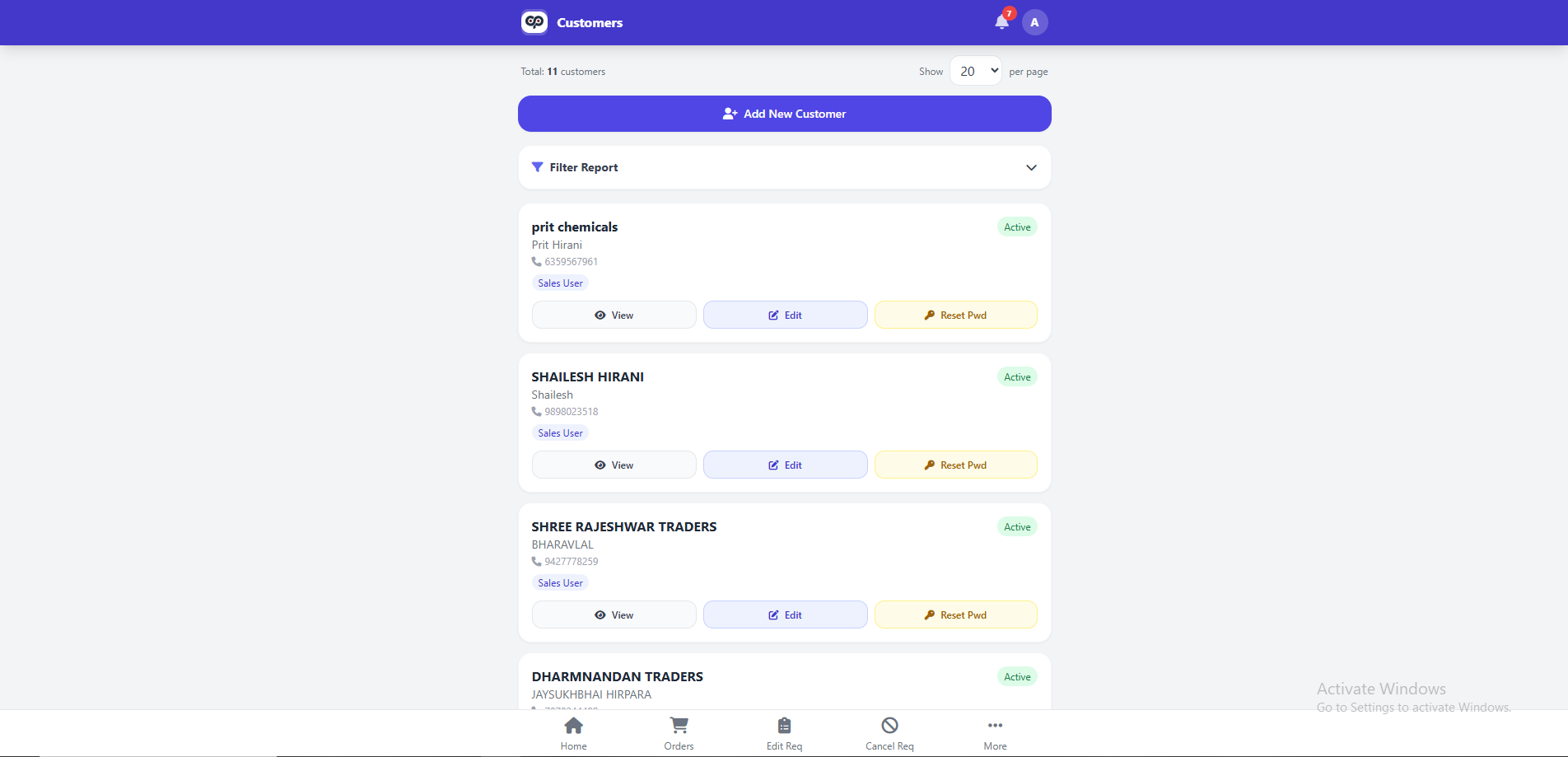
Central customer database: business profile, contact details, delivery address and full order history. The system allows businesses to rapidly search for existing customers, manage their information and build long-term relationships with customers. All your customer data is in one place, so you don't have to enter the same data twice and you can create orders faster. It also improves communication and customer service.
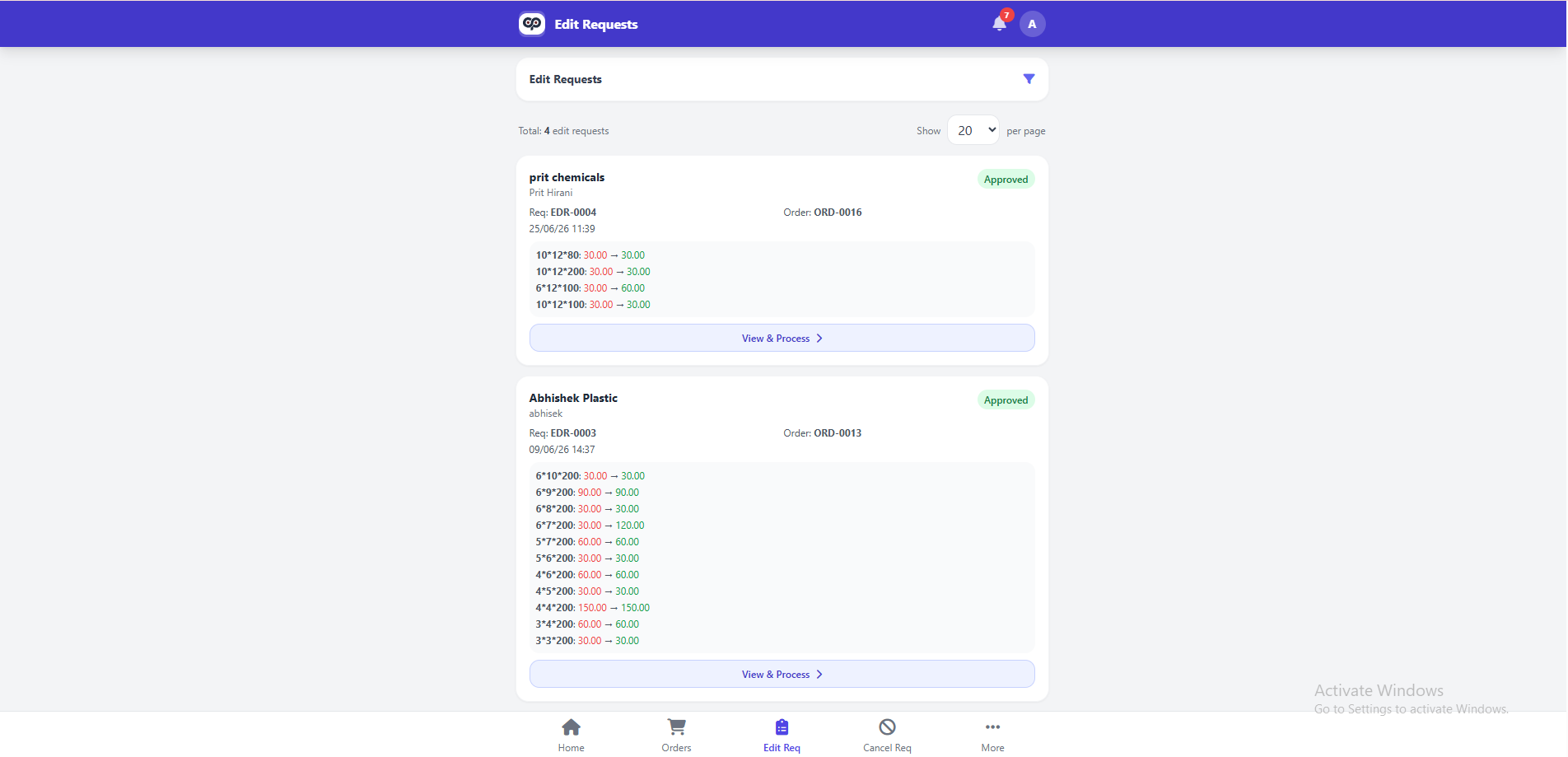
Edit Request Management
Mobile application users are able to directly send modification requests for current orders without the need for manual contact with the administrator. Every requested change in quantity is recorded with full transparency and is subject to an approval process. Each request can be approved, rejected or reviewed by administrators with a detailed audit trail. Such structured flows of work has a direct impact on communication lags and errors in order modifications.
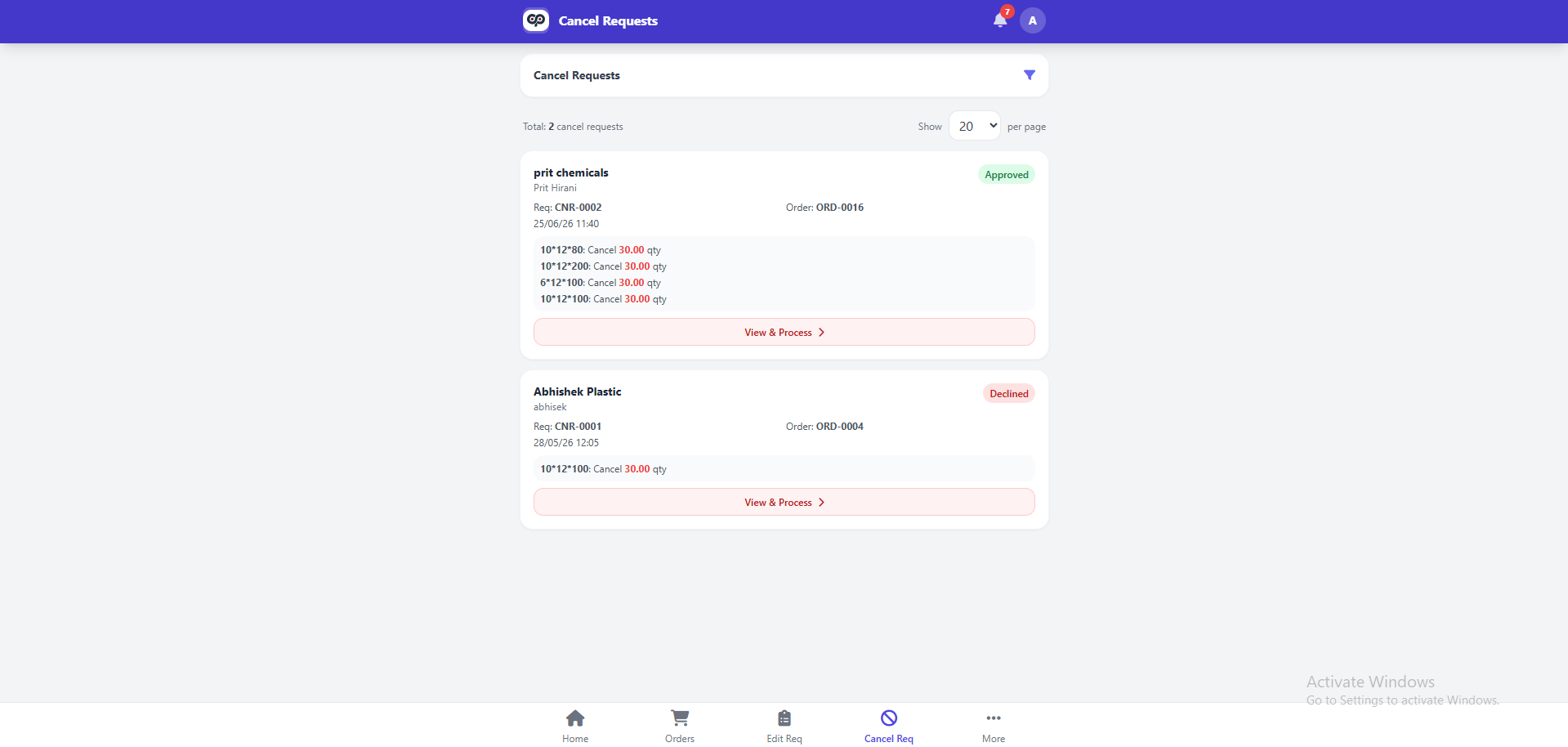
Cancellation Request Management
The application provides a controlled order cancelation process through its dedicated cancelation request module. The administrator approves each cancelation request after checking to ensure that inventory is accurate and business is controlled. When orders are approved, the system automatically updates order quantities. Future reference is made to complete cancelation records. This helps companies to deal with cancelations in a professional and efficient way.
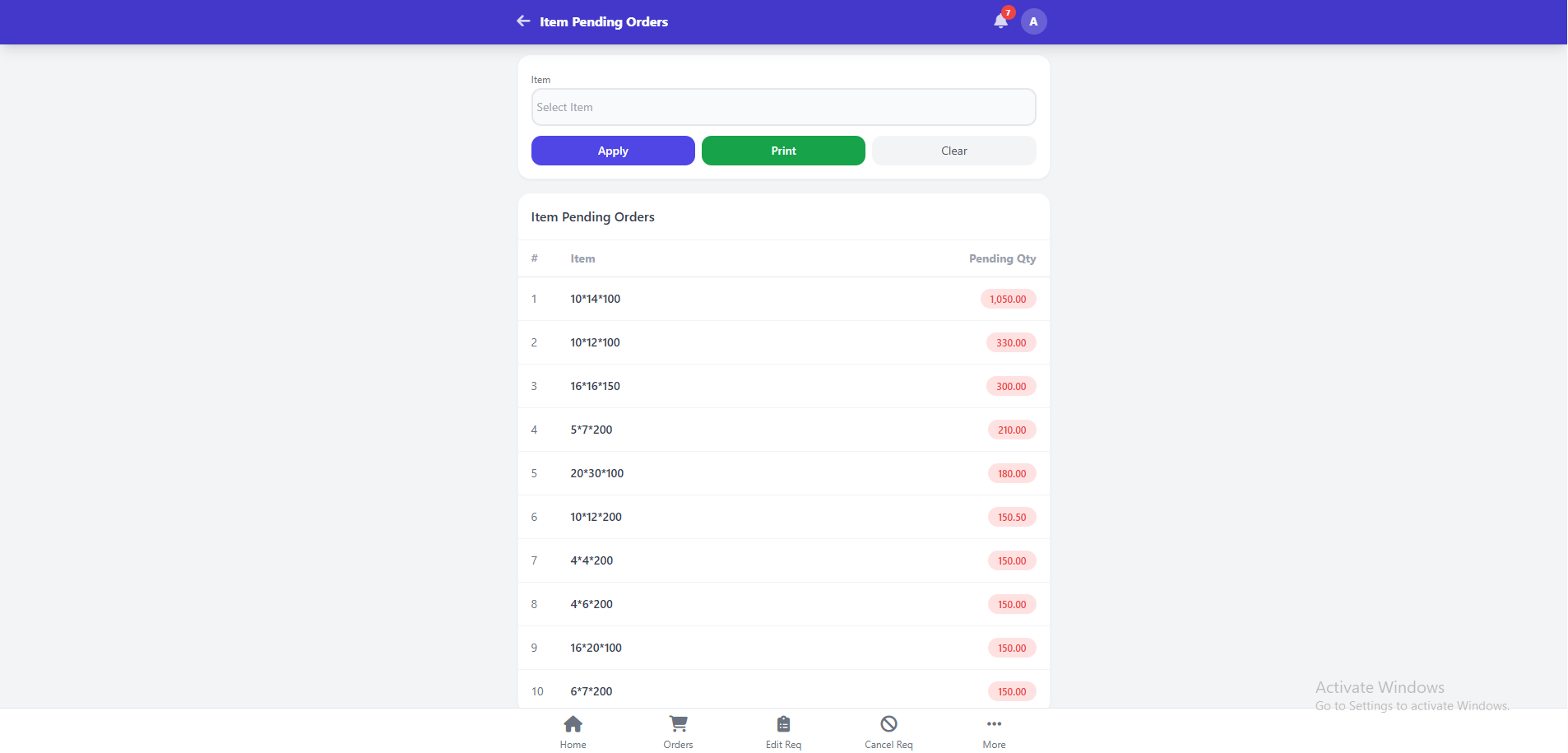
Pending Item Tracking
Use a dedicated pending order module to track pending quantities on a product-wise basis for production and inventory planning. Users can easily know what are the products that need to be manufactured or dispatched on the basis of current pending orders. The system also provides the ability to filter, search and print pending reports for operational use. This can help in reducing stock-outs and improving production scheduling.
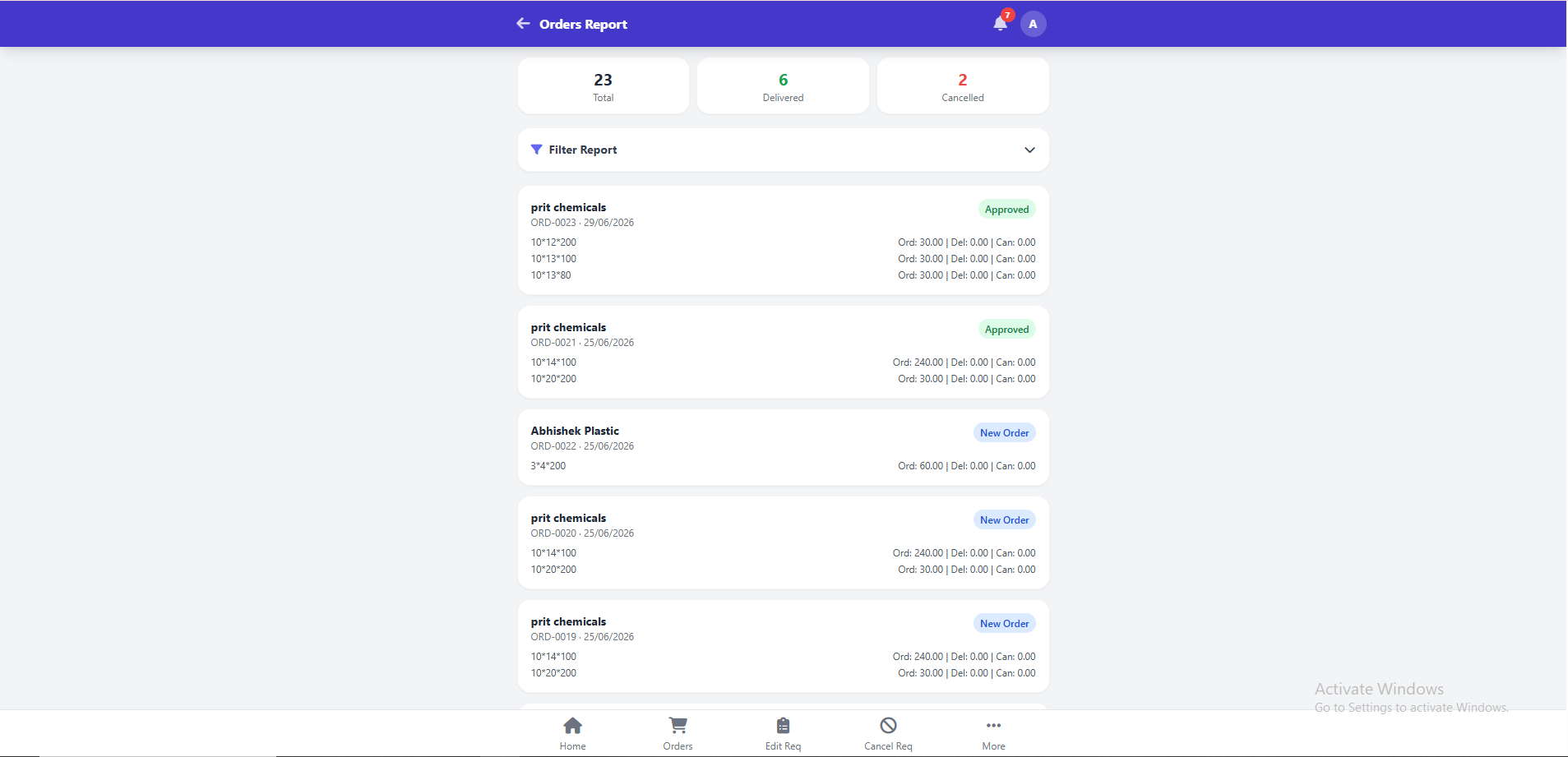
Reports & Business Analytics
Generate detailed reports on orders received, quantities shipped, canceled, pending and overall order performance. Business owners receive vital information on day-to-day activities through user-friendly reports and summaries. With these reports, management can view productivity, recognize patterns, and make fact based business decisions. Reporting system boosts planning, forecasting and overall performance of business.
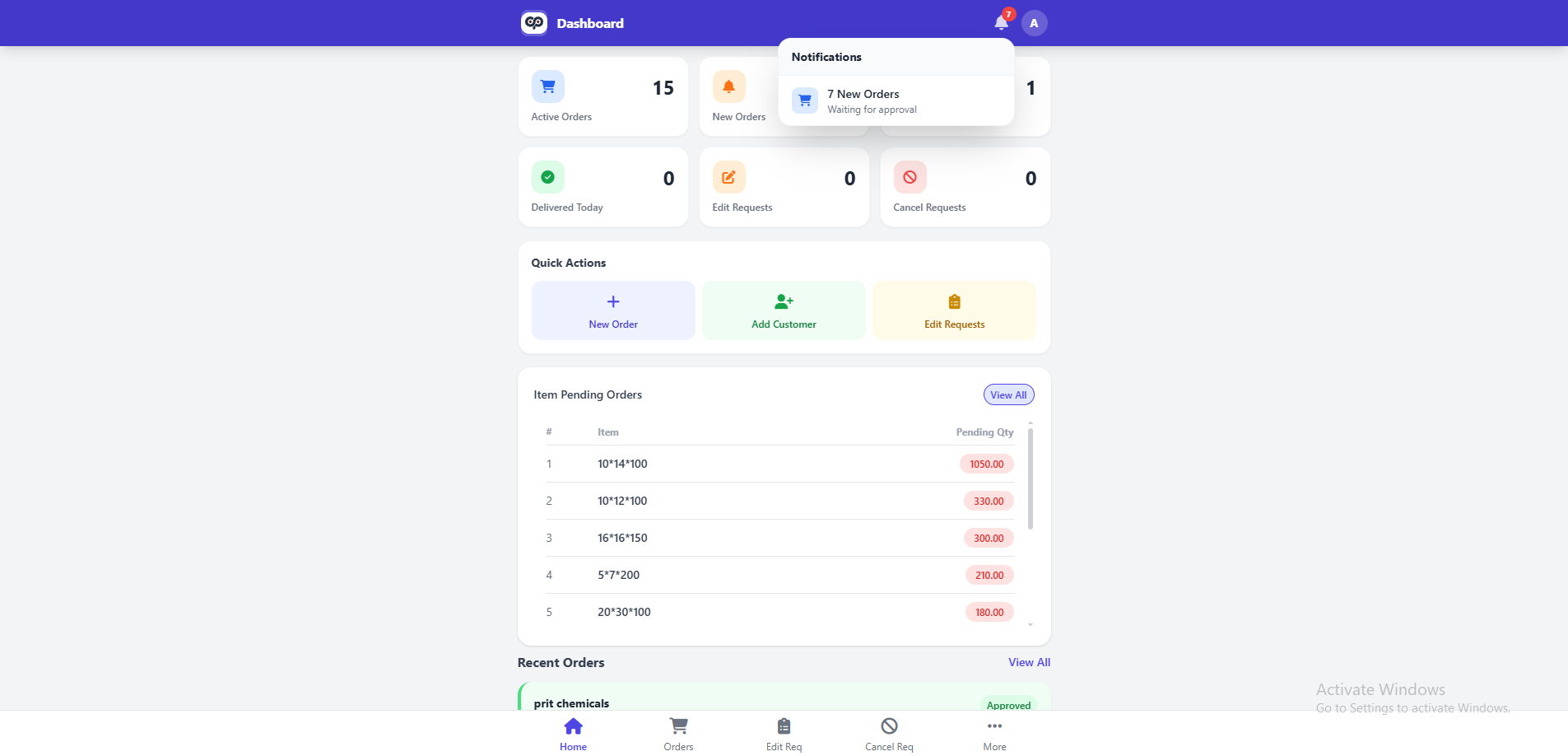
Real-Time Notifications
The integrated notification system provides users with real-time information about important business events. Notifications are generated by new orders,edit requests,cancellation requests,approvals and other operational activities. This means that administrators, sales teams and customers can stay up to date without a constant manual follow-up. Instant alerts enhance communication and the efficiency of the overall workflow.
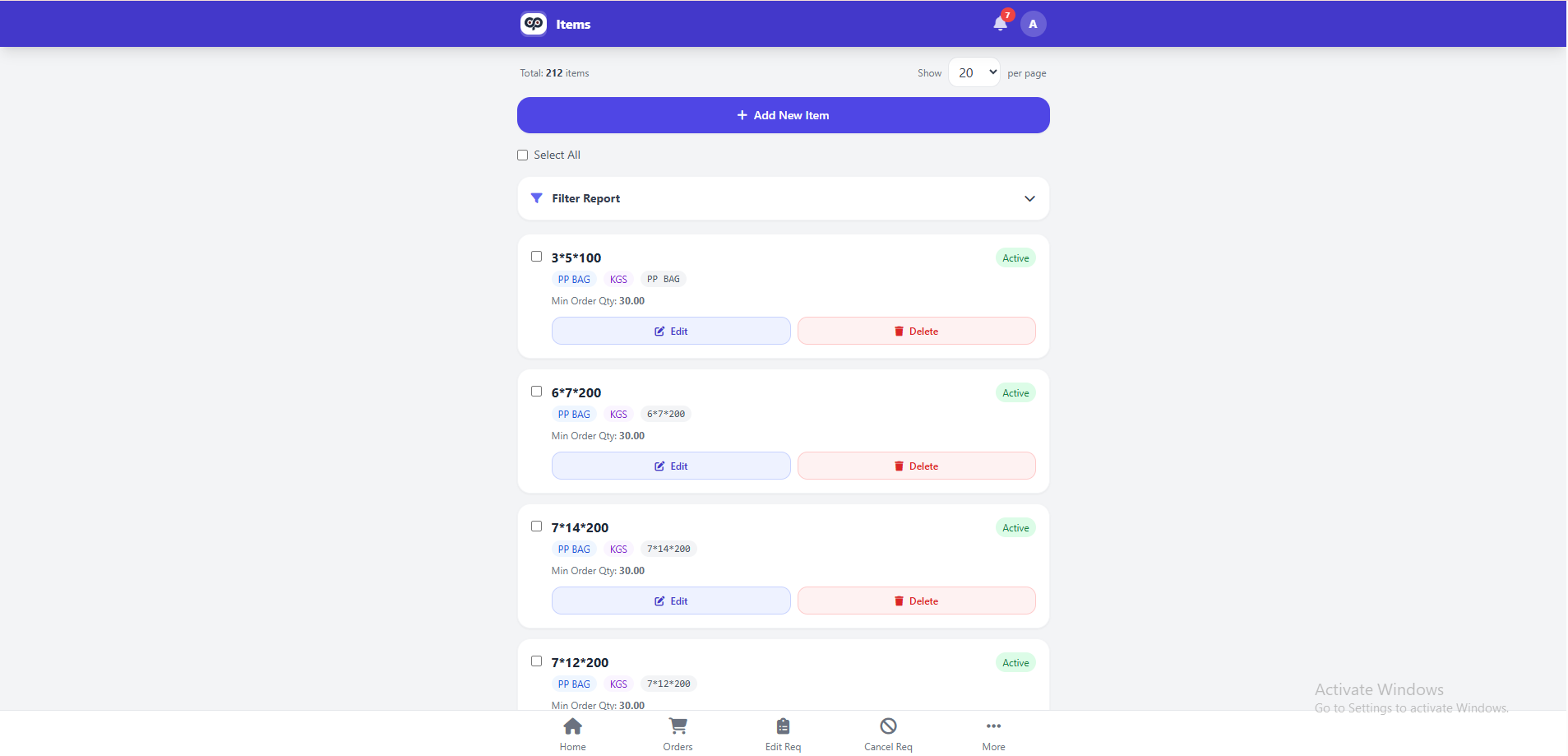
Product & Category Management
A central management module lets you manage products, categories, units of measure and business configurations. The administrators can easily add new products, update pricing, arrange categories and maintain correct product information throughout the platform. From an order management process perspective, this brings uniformity to the order management process and reduces administrative overheads.
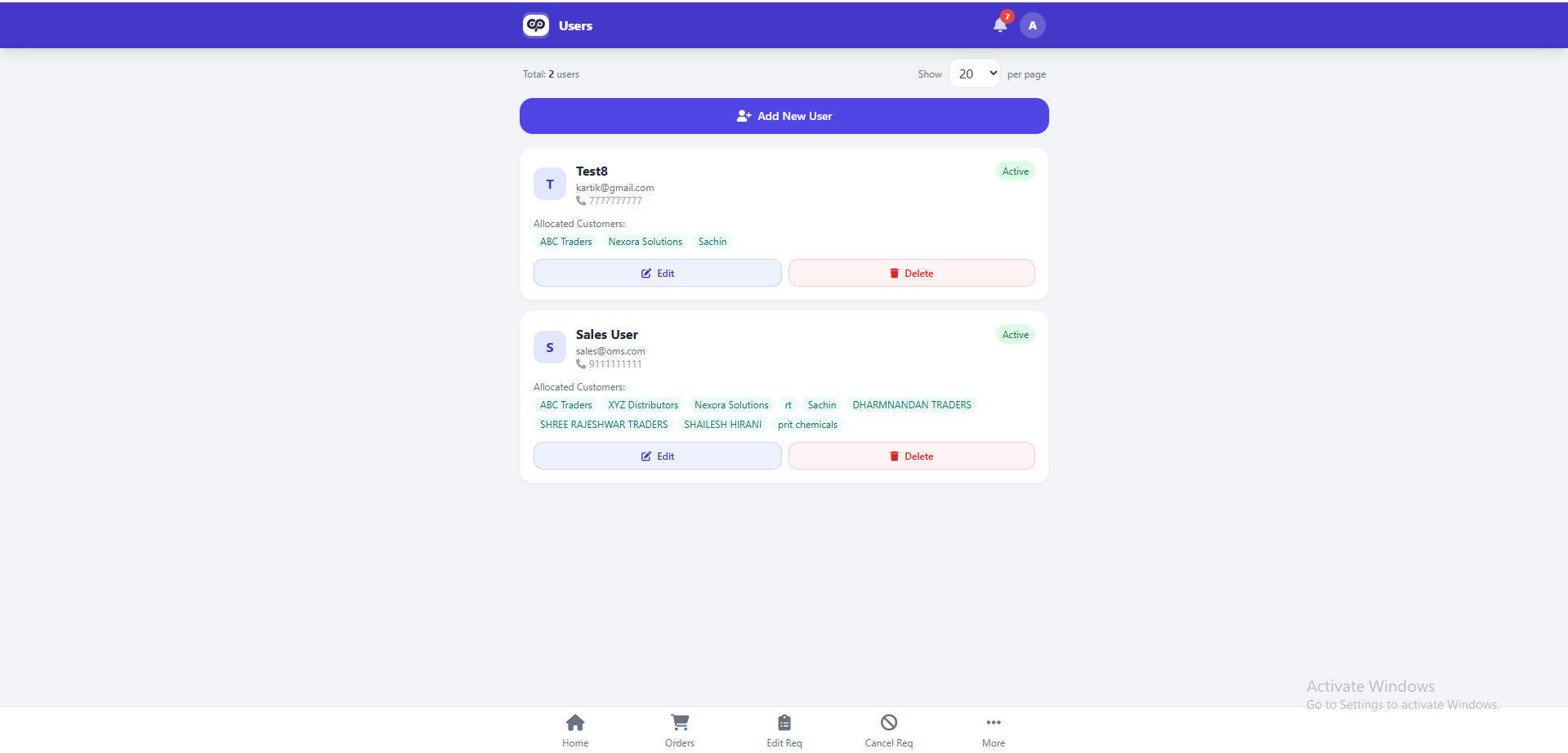
User & Access Management
The platform also provides robust role-based access control, so companies can create multiple users with different levels of permissions. According to the need of the organization the admin can assign a role like Admin, Manager, Sales Executive or Staff. This increases security by limiting users to only the modules they need to do their work, but still allows full administrative control.



Client Success Stories
Real stories from clients who scaled faster and smarter with CodeChain’s custom software solutions.
I had a really good experience working with CodeChain Technologies. They built an app for our AC service business that helps both customers and owners manage services easily. The team understood what we needed, worked quickly, and delivered exactly as promised. I’m very happy with their work and support.

Keyur Sukhadiya
Owner, SK Air Conditioner
Working with CodeChain Technologies was a very professional experience. They developed a complete ERP system for our school, tailored to meet all our administrative and academic needs. The team was responsive, thorough, and delivered the project on time. I am extremely satisfied with their work and support.

Kishan Mangukiya
Trustee, The Radiant International School
It was a great experience working with CodeChain Technologies. They made our website and mobile app for our diamond machine service just the way we wanted. The team understood our needs well, worked on time, and always supported us. I really liked their work and friendly attitude.

Kartik Donda
Owner, MacSwin Technology
Working with CodeChain Technologies has been a great experience. They built an app and website for our inventory and service management that works really well for our daily operations. The team was helpful, professional, and always ready to support us. I’m very happy with their work.

Anil Tarpara
Owner, MAK Tech
I had an excellent experience working with CodeChain Technologies. They developed my Battleground Village mobile game with outstanding quality and attention to detail. Later, they upgraded my existing website with new features and improved functionality. Recently, they built a restaurant table booking system that’s efficient, responsive, and perfectly meets my business needs.

Rakesh Patil
Owner, Battle Village
Working with CodeChain Technologies was a very professional experience. They developed a competitive quiz app with a website for us, along with an e-commerce platform. The entire process was smooth, and the team maintained clear communication throughout. I’m fully satisfied with their quality of work and timely delivery.

Karan Bengani
Owner Kracknow
It’s been a great experience working with CodeChain Technologies. They developed an inventory and invoicing management system for our company that works perfectly for our daily operations. The team was professional, cooperative, and always ready to help. I’m really happy with their work and final results.

Sagar Vaghasiya
Owner, Dolphin Laser Machine Pvt. Ltd.
Working with CodeChain Technologies was a smooth and positive experience. They built a website and app that make managing our daily operations and business processes much easier. The team was attentive, professional, and always ready to help. I’m very satisfied with their dedication and results.

Himmat Bhanushali
Director, D.H.S Logistics Pvt. Ltd.
What our clients say
I had a really good experience working with CodeChain Technologies. They built an app for our AC service business that helps both customers and owners manage services easily. The team understood what we needed, worked quickly, and delivered exactly as promised. I’m very happy with their work and support.
Keyur Sukhadiya
Owner, SK Air Conditioner
Working with CodeChain Technologies was a very professional experience. They developed a complete ERP system for our school, tailored to meet all our administrative and academic needs. The team was responsive, thorough, and delivered the project on time. I am extremely satisfied with their work and support.
Kishan Mangukiya
Trustee, The Radiant International School
It was a great experience working with CodeChain Technologies. They made our website and mobile app for our diamond machine service just the way we wanted. The team understood our needs well, worked on time, and always supported us. I really liked their work and friendly attitude.
Kartik Donda
Owner, MacSwin Technology
Working with CodeChain Technologies has been a great experience. They built an app and website for our inventory and service management that works really well for our daily operations. The team was helpful, professional, and always ready to support us. I’m very happy with their work.
Anil Tarpara
Owner, MAK Tech
I had an excellent experience working with CodeChain Technologies. They developed my Battleground Village mobile game with outstanding quality and attention to detail. Later, they upgraded my existing website with new features and improved functionality. Recently, they built a restaurant table booking system that’s efficient, responsive, and perfectly meets my business needs.
Rakesh Patil
Owner, Battle Village
Working with CodeChain Technologies was a very professional experience. They developed a competitive quiz app with a website for us, along with an e-commerce platform. The entire process was smooth, and the team maintained clear communication throughout. I’m fully satisfied with their quality of work and timely delivery.
Karan Bengani
Owner Kracknow
It’s been a great experience working with CodeChain Technologies. They developed an inventory and invoicing management system for our company that works perfectly for our daily operations. The team was professional, cooperative, and always ready to help. I’m really happy with their work and final results.
Sagar Vaghasiya
Owner ZLine Laser technology
Working with CodeChain Technologies was a smooth and positive experience. They built a website and app that make managing our daily operations and business processes much easier. The team was attentive, professional, and always ready to help. I’m very satisfied with their dedication and results.
Himmat Bhanushali
Director, D.H.S Logistics Pvt. Ltd.
Contact US
We respect your privacy. View our Privacy Policy.
Your Benefits
- Client-Focused
- Transparency
- Results-Driven
- Skilled Experts
- Independent Thinking
- Problem Solvers
What to Expect Next
- We Schedule a Call at Your Convenience.
- We listen before we advise.
- You’ll receive a clear, tailored plan.