
ASL - Learn Tracking System
ASL (Dmart) - Learn Track is a Moodle based Learning Management System (LMS) for managing the employe training throughout the organization. It gives administrators control over users, courses, learning plans and reports, while employes have access to assigned training, track progress, and complete assessments and certificates for download. The system also automates onboarding and the learning plan assignment of employe profile details to provide the right training through an Structured Learning Course
Contact Us
About Project
Location
Mumbai
Industry
E-learning
Project Duration
1 Year
Team Members
1 People
The Challenges & Their Solutions
Training a large workforce across locations, departments and job-role was a challenge. Manual course assignment was time consuming and error prone.
Automated Learning Plan assignment was implemented based on employe profile fields such as Work Location, Department, Designation, Grade and Employe Type to reduce manual effort.
Different job functions required different training programs and it was difficult to ensure that all employes received the right learning content.
Developed role-based Learning Plans for automatically assigning relevant courses to employes based on established business rules.
Employes had difficulty in tracking their courses, learning progress and training deadlines in various sections of the LMS.
Developed a centralized Student Dashboard that gives learners a single view of Not Started, In Progress, Completed, Due and Overdue courses.
The challenge for the administrators was to track course completion, learner progress, and compliance across the company.
Designed and developed a robust reporting module to track real time with User Reports, Course Completion Reports, Training Reports and Learning Plan progress reports.
Key Features
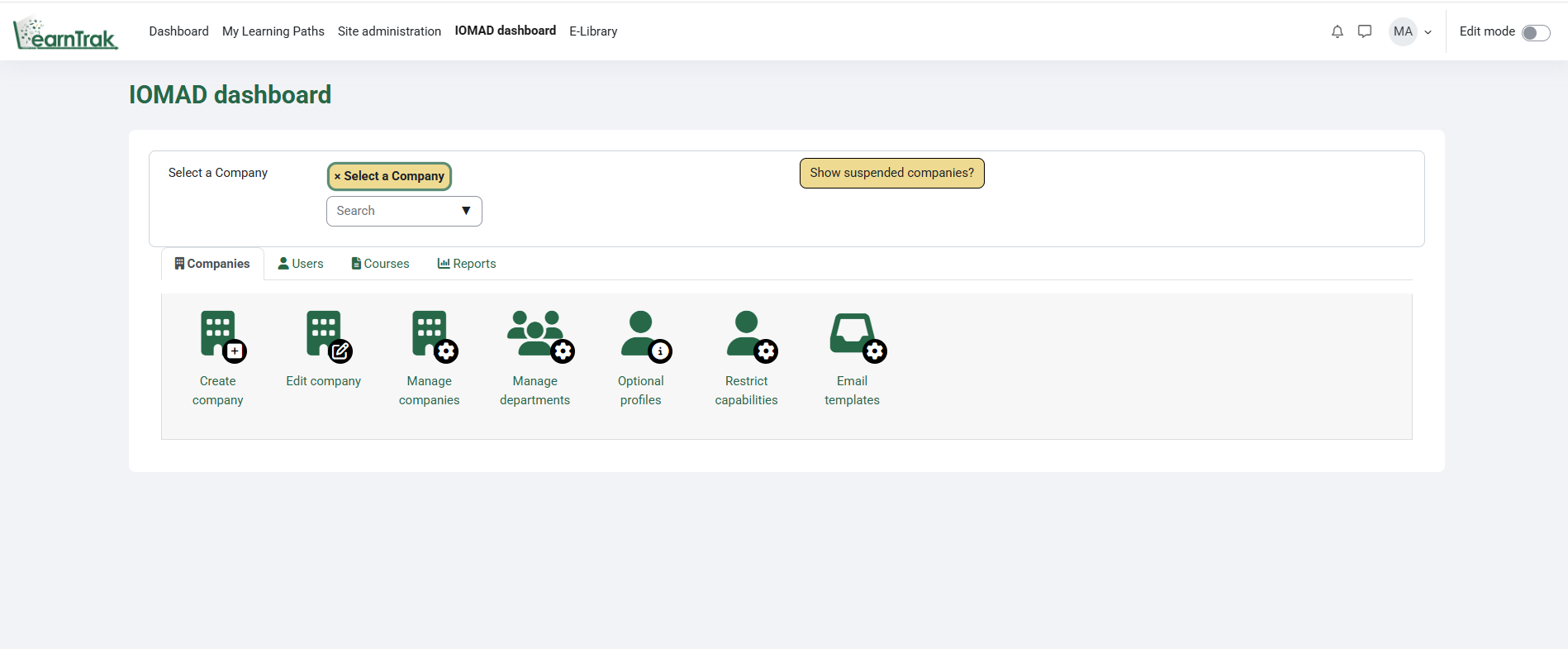
Administrator Dashboard
The Administrator Dashboard is your one stop shop for managing the entire LMS. Admin is able to create and manage Users, Courses, Learning Plans, Roles, Permissions, Departments, Enrollments, Reports, Plugins and System Settings from a single place. This simplifies the day-to-day administration and results in effective platform management and seamless learning operation.
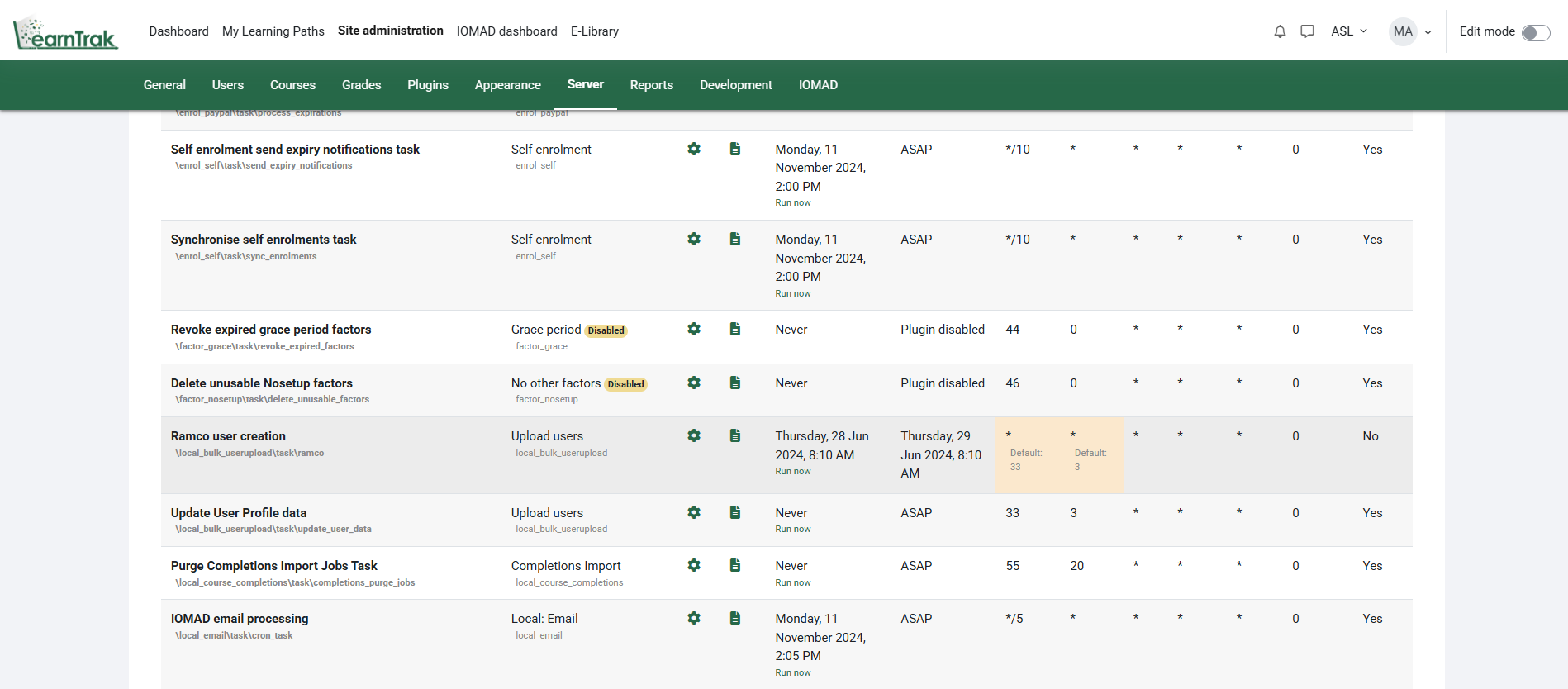
Automated User Management & Learning Path Assignment
The system will create and update accounts of employes automatically by synchronizing data from the external systems with the help of scheduled cron jobs. LMS assigns the right learning paths to each employe automatically based on custom profile fields like Work Location, Department, Designation and Operation. This means less work by hand, and that every employe receives the right training from day one.
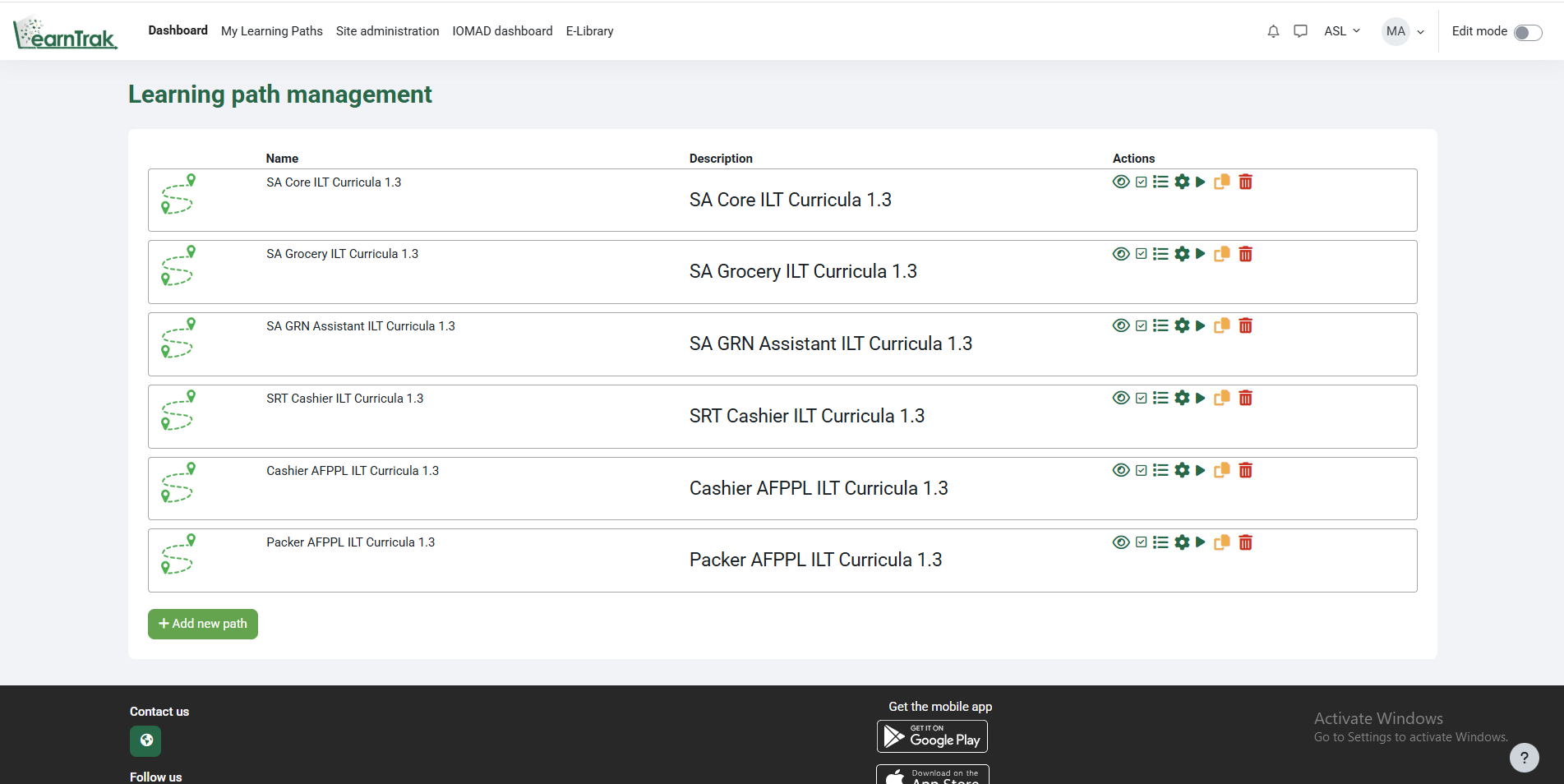
Learning Path Management & Sequential Learning
Administrators can build role based Learning Paths of multiple courses and auto assign them to users based on configurable profile criteria like Work Location, Department, Designation, Job Role, Grade, Employe Type and other custom fields. Also on the platform, there is sequential learning, where learners must complete each course before progressing to the next, ensuring a structured and compliant educational experience.
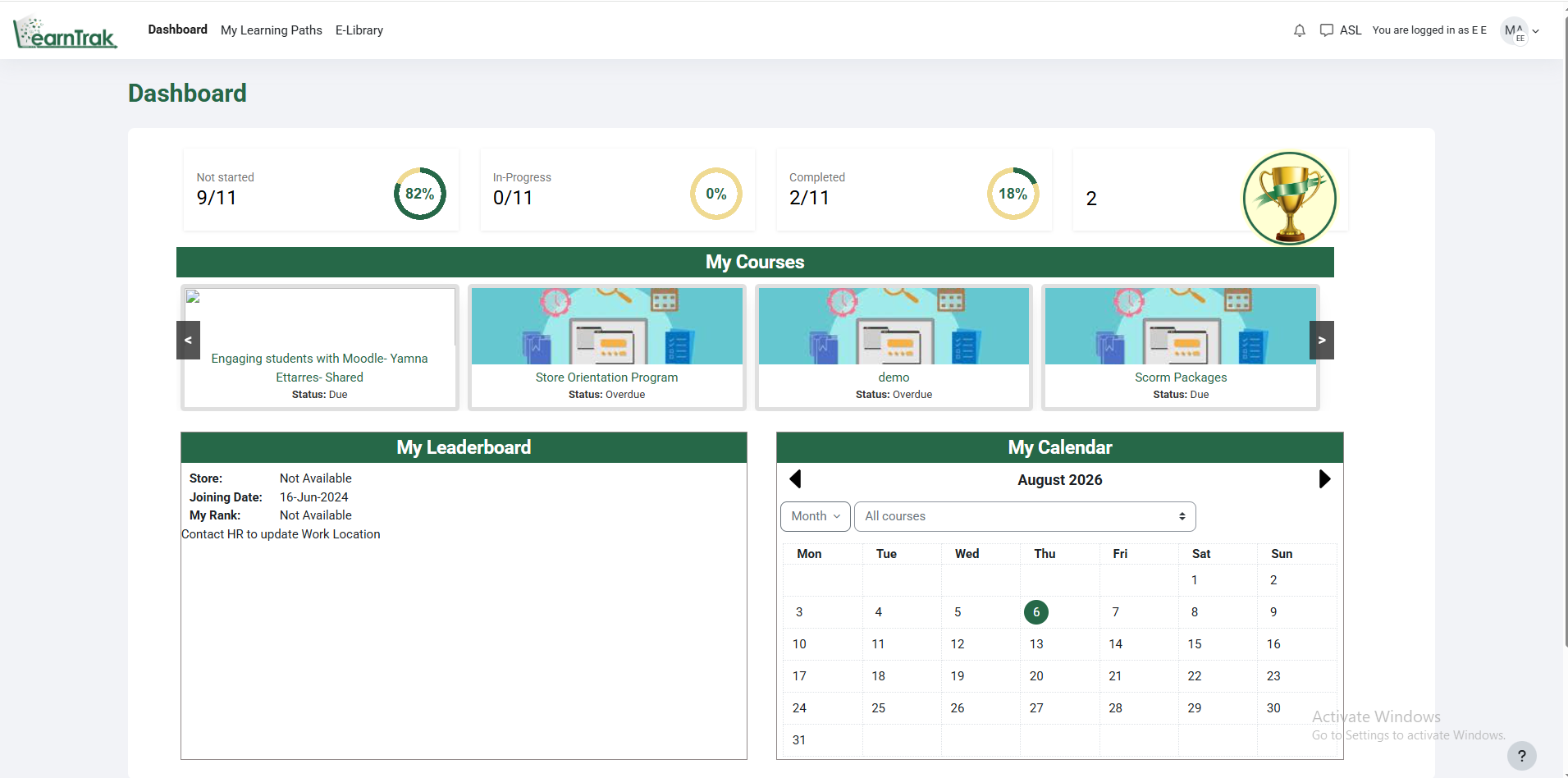
Student Dashboard
The Student Dashboard gives a learner a complete view of the training assigned to them including the number of courses Not Started, In Progress and Completed. Learners may click on each category to view the course list and access their training. The dashboard also shows assigned courses, learning progress, upcoming deadlines and a calendar, enabling users to effectively manage and complete their educational journey.
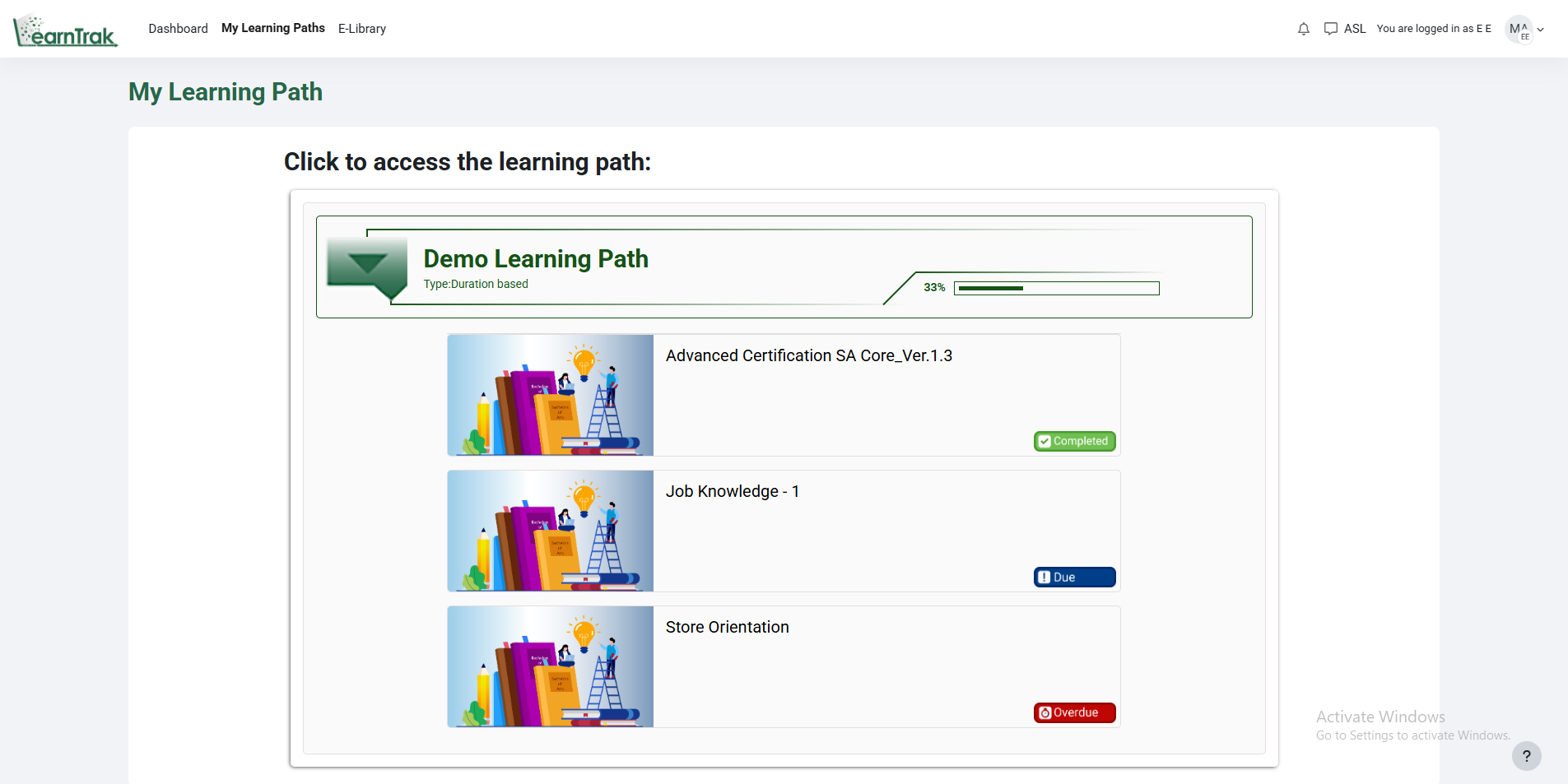
Student Learning Paths
My Learning Paths Here you can view all of the Learning Paths assigned to the learner and the overall completion progress. Each Learning Path shows the courses assigned to it and status of each course (Not Started, In Progress, Completed, Due, Overdue) clearly. Learners can easily track their progress, access the courses assigned to them and complete their training within the stipulated timelines.
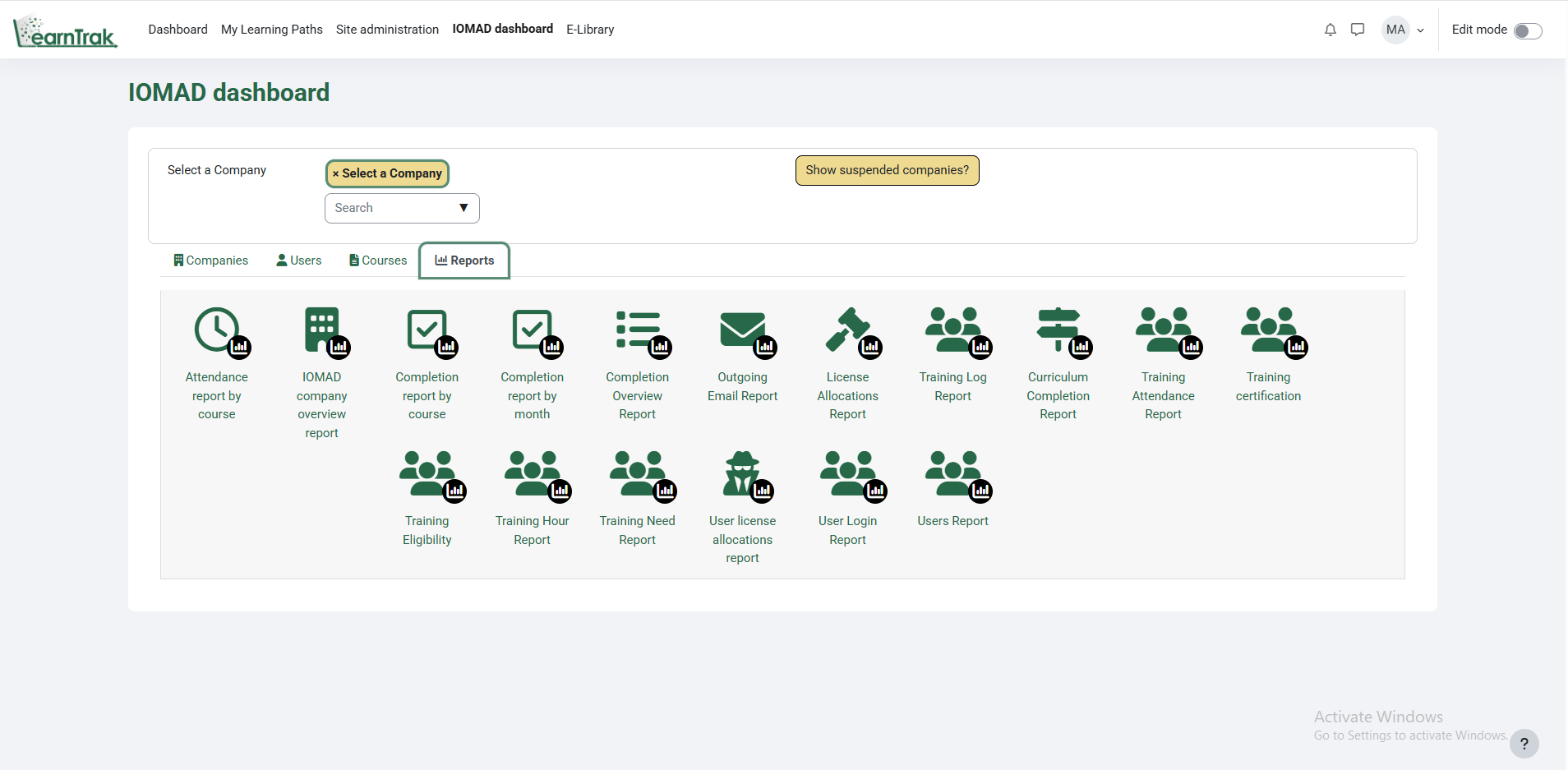
Reports & Analytics
The Reports module allows administrators to see in-depth learner activity and progress through training. UsReports Course Completion Reports er Reports on Learning Plans; Training Hours Attendance Reports License Certificates Login Activity Reports on allocation and other matters are provided to monitor performance, ensure compliance and analyze learning outcomes. Advanced options to easily filter & export user details & organization wide training data.


Client Success Stories
Real stories from clients who scaled faster and smarter with CodeChain’s custom software solutions.
I had a really good experience working with CodeChain Technologies. They built an app for our AC service business that helps both customers and owners manage services easily. The team understood what we needed, worked quickly, and delivered exactly as promised. I’m very happy with their work and support.

Keyur Sukhadiya
Owner, SK Air Conditioner
Working with CodeChain Technologies was a very professional experience. They developed a complete ERP system for our school, tailored to meet all our administrative and academic needs. The team was responsive, thorough, and delivered the project on time. I am extremely satisfied with their work and support.

Kishan Mangukiya
Trustee, The Radiant International School
It was a great experience working with CodeChain Technologies. They made our website and mobile app for our diamond machine service just the way we wanted. The team understood our needs well, worked on time, and always supported us. I really liked their work and friendly attitude.

Kartik Donda
Owner, MacSwin Technology
Working with CodeChain Technologies has been a great experience. They built an app and website for our inventory and service management that works really well for our daily operations. The team was helpful, professional, and always ready to support us. I’m very happy with their work.

Anil Tarpara
Owner, MAK Tech
I had an excellent experience working with CodeChain Technologies. They developed my Battleground Village mobile game with outstanding quality and attention to detail. Later, they upgraded my existing website with new features and improved functionality. Recently, they built a restaurant table booking system that’s efficient, responsive, and perfectly meets my business needs.

Rakesh Patil
Owner, Battle Village
Working with CodeChain Technologies was a very professional experience. They developed a competitive quiz app with a website for us, along with an e-commerce platform. The entire process was smooth, and the team maintained clear communication throughout. I’m fully satisfied with their quality of work and timely delivery.

Karan Bengani
Owner Kracknow
It’s been a great experience working with CodeChain Technologies. They developed an inventory and invoicing management system for our company that works perfectly for our daily operations. The team was professional, cooperative, and always ready to help. I’m really happy with their work and final results.

Sagar Vaghasiya
Owner, Dolphin Laser Machine Pvt. Ltd.
Working with CodeChain Technologies was a smooth and positive experience. They built a website and app that make managing our daily operations and business processes much easier. The team was attentive, professional, and always ready to help. I’m very satisfied with their dedication and results.
Himmat Bhanushali
Director, D.H.S Logistics Pvt. Ltd.
What our clients say
I had a really good experience working with CodeChain Technologies. They built an app for our AC service business that helps both customers and owners manage services easily. The team understood what we needed, worked quickly, and delivered exactly as promised. I’m very happy with their work and support.
Keyur Sukhadiya
Owner, SK Air Conditioner
Working with CodeChain Technologies was a very professional experience. They developed a complete ERP system for our school, tailored to meet all our administrative and academic needs. The team was responsive, thorough, and delivered the project on time. I am extremely satisfied with their work and support.
Kishan Mangukiya
Trustee, The Radiant International School
It was a great experience working with CodeChain Technologies. They made our website and mobile app for our diamond machine service just the way we wanted. The team understood our needs well, worked on time, and always supported us. I really liked their work and friendly attitude.
Kartik Donda
Owner, MacSwin Technology
Working with CodeChain Technologies has been a great experience. They built an app and website for our inventory and service management that works really well for our daily operations. The team was helpful, professional, and always ready to support us. I’m very happy with their work.
Anil Tarpara
Owner, MAK Tech
I had an excellent experience working with CodeChain Technologies. They developed my Battleground Village mobile game with outstanding quality and attention to detail. Later, they upgraded my existing website with new features and improved functionality. Recently, they built a restaurant table booking system that’s efficient, responsive, and perfectly meets my business needs.
Rakesh Patil
Owner, Battle Village
Working with CodeChain Technologies was a very professional experience. They developed a competitive quiz app with a website for us, along with an e-commerce platform. The entire process was smooth, and the team maintained clear communication throughout. I’m fully satisfied with their quality of work and timely delivery.
Karan Bengani
Owner Kracknow
It’s been a great experience working with CodeChain Technologies. They developed an inventory and invoicing management system for our company that works perfectly for our daily operations. The team was professional, cooperative, and always ready to help. I’m really happy with their work and final results.
Sagar Vaghasiya
Owner ZLine Laser technology
Working with CodeChain Technologies was a smooth and positive experience. They built a website and app that make managing our daily operations and business processes much easier. The team was attentive, professional, and always ready to help. I’m very satisfied with their dedication and results.
Himmat Bhanushali
Director, D.H.S Logistics Pvt. Ltd.
Contact US
We respect your privacy. View our Privacy Policy.
Your Benefits
- Client-Focused
- Transparency
- Results-Driven
- Skilled Experts
- Independent Thinking
- Problem Solvers
What to Expect Next
- We Schedule a Call at Your Convenience.
- We listen before we advise.
- You’ll receive a clear, tailored plan.